Download our free SEO White Paper to learn more about our service and the process behind our work.
Download our free Web Development White Paper to learn more about our service and the process behind our work.
Download our free SEO White Paper to learn more about our service and the process behind our work.

Download our free Web Development White Paper to learn more about our service and the process behind our work.
Give yourself and your customer’s peace of mind.
Protect yourself and your customers online with a SSL Certificate. Have peace of mind that e-commerce transactions and sensitive information sent over the internet are secure.
Instalogic can setup and install SSL Certificates.
Home / Security & SSL
With the rise in cyber security threats, implementing preventative measures to protect your website has never been more critical, especially for sites that facilitate online transactions or are hosted on popular platforms like WordPress. Recent reports show that even companies with dedicated cybersecurity are not immune to attacks, highlighting the need for practical safeguards.
Securing your website not only protects sensitive information and data, but also saves you time and money in the long run. Our Calgary web agency can help ensure your website is protected from potential cyber attacks.
Here are some essential tools, best practices, and strategies we recommend to fortify your website’s security:


Secure Socket Layer (SSL) creates an encrypted link between a server and a web browser, securing data exchange between your website and its visitors. This is essential for WordPress websites, especially eCommerce platforms that handle sensitive customer payment information.
In simper terms. If your website collects any sensitive user or financial information, obtaining an SSL certificate is necessary. It activates the Hypertext Transfer Protocol Secure (HTTPS) you often see at the beginning of a website URL. When users hover the lock icon in the browser’s address bar, they should se the message “Connection is secure”, reassuring them that your site can be trusted. Providing this level of security is the minimum standard you want for your users.
You can obtain an SSL from a domain registrar, hosting provider or certificate authority (CA). Many hosting providers include it in their hosting packages, but if yours doesn’t, you can acquire one for free from CAs like Let’s Encrypt or purchase one from a low-cost authority. Keep in mind that, as with most services, premium options typically come with a higher price tag. But they often provide superior service.
Work with a Reliable Hosting Provider Choosing a reputable hosting provider is crucial not only for protecting your website but also for ensuring good uptime, fast load times, and easy set-up. First-time site owners may feel overwhelmed by the many available options.
When selecting a hosting provider, consider these key features:
According to CyberNews( – backlink to source??), some of the most secure hosting providers in 2023 include SiteGround, DreamHost, Hostinger, A2 Hosting, and Interserver. Additionally, Top10.com- (backlink to source??) highlights Hostinger as exceptional and mentioned IONOS by 1&1, web.com, and Network Solutions
It’s important to note that many website owners mistakenly believe secure web hosting is only for high-traffic sites and large corporations. In reality, everyone needs to protect their users, making secure hosting accessible and necessary for all businesses.


One of the biggest mistakes people make with their website and email accounts is using easily guessable password. Combinations of names, dates of birth, or simple number sequences follow by an exclamation mark create vulnerabilities that hackers can exploit. To ensure a strong password, use a mix of numerical characters, both uppercase and lowercase letters, and special characters.
Most browsers can suggest strong passwords, and free password managers like Dashlane can help you manage and control your passwords across multiple devices.
In additional to strong passwords, implementing two-factor authentication (2FA) enhances website security. This system, requires two forms for verification to block malicious hacking attempts, linking your password to an additional security layer. This can include text code, facial recognition, dual-sided puzzles, fingerprint scans, or retina scans. For a limited number of users, providers such as Duo offer free 2FA setup, making it easier to secure your accounts.
Can I make my website secure for free?
Yes, almost. To do it, keep your passwords hard to guess and do not have your username as Admin. Find a reliable hosting provider, preferably one which includes a firewall and anti-malware software. Get an SSL certificate from a certificate authority such as Let’s Encrypt. You can also find anti-malware software free of cost or at discounted prices.
How do I secure my website on Chrome?
Go to the top right corner of your screen and click on the three dots. Then, click on settings and select privacy and security on the left-hand side. Click on security on the right and choose your setting to enhanced protection. Also, in the security panel itself, click on “Always use secure connections”.
Make sure you click only on secure websites – these will have HTTPS in the URL box next to a padlock icon. HTTPS and padlock should also be on your website to protect you and your users. Install an SSL certificate to get the feature.
Further, Chrome notifies you if any passwords in the browser are compromised. It also flags malicious extensions. Keep an eye out for this notification or check it out manually under the Security tab.
How do I make sure my website is secure?
Steps to take: Install SSL, use anti-malware software, keep your website updated, and passwords unguessable.
Additionally, make sure you don’t click on fishy links – check the domain name of emails to know if it comes from a trusted source. You can also call the source to verify the links. Run regular backups ready yourself for the worst-case scenario. Also, form a shield between your website and the internet via web application firewall.



Having a website today is far simpler than it was 10 or 15 years ago. Tools like content management systems (CMS), website builders, and static site generators remove much of the complexity involved in creating and managing websites. However, with this convenience comes certain misconceptions, particularly regarding website security.
One of the biggest misconceptions is what truly makes a website secure. For example, with Google Chrome version 68, websites without SSL certificates are flagged as “Not Secure” in the browser’s address bar. While SSL certificates encrypt data exchanged between the visitor and the web server, this alone does not protect the website from hackers. Effective website security involves more than just SSL – website owners must implement a broader range of security measures to ensure full protection.
SSL is a standard security technology used to establish an encrypted link between a web server and a browser and has become a critical best practice for website security.
We recently published an article discussing why websites should make the switch to SSL. Major web authorities like Google and Mozilla are pushing for website owners to adopt HTTPS. One of the enforcement methods from Google includes marking sites as “Not Secure” in Chrome, starting with version 68.
SSL Certificates protect data integrity during transit, preventing anyone from intercepting or altering the information commonly referred to as a man-in-the-middle attack. Regardless of the type, all SSL certificates verify the domain name of the website.
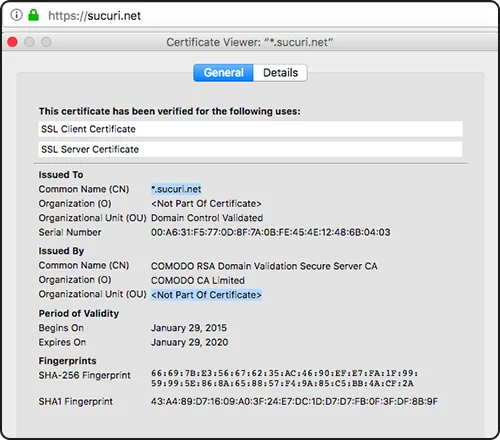
DV SSL Certificates are the most popular SSL certificates on the Internet, even though they only validate the domain name.
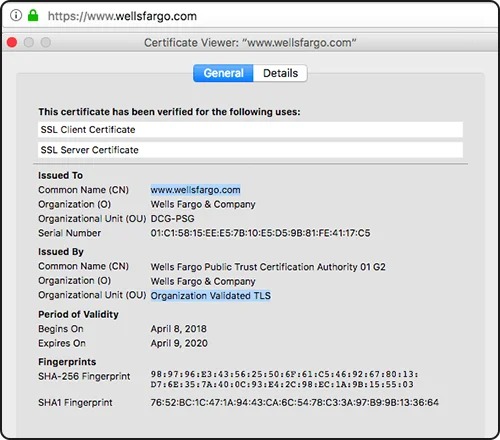
OV SSL Certificates require more documentation for a Certificate Authority to certify the organization making the request is registered and legitimate.
These certificates will display the name of the organization if you click on the padlock that appears on the top left corner of a browser.
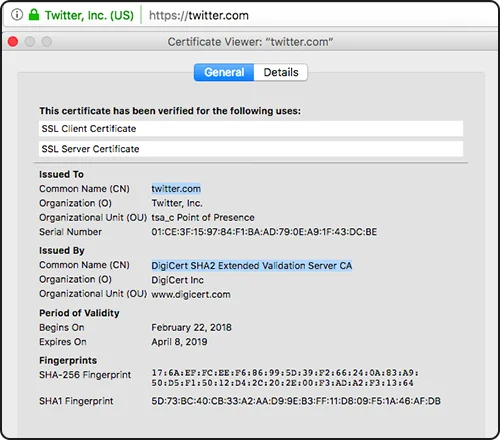
EV SSL Certificates require even more documentation for a Certificate Authority to validate the organization making the request. These certificates will display both a padlock and the name of the organization.
EV SSL Certificates require even more documentation for a Certificate Authority to validate the organization making the request. These certificates will be more visible because besides displaying the padlock in the address bar, they will also display the name of the organization.

SSL certificates cannot protect a website from a malware infection, nor can they stop a website from spreading malware.
Ironically, infected websites served over HTTPS will ensure the integrity of the malware until it reaches its potential victims, aka the website’s visitors. That is something both webmasters and Internet users need to be really mindful of.
It is important to make sure to force HTTPS after you install an SSL certificate on your website. If attackers compromise your site and link to malware assets over HTTP, browsers will display mixed content warnings.
A website’s padlock in the address bar does not mean the website is secured. It only means that the information between the website’s server and the browser is secured.
Defining website security is difficult as it varies depending on the needs of each organization. For example, a personal blog doesn’t require the same level of protection as an e-commerce store or a web development agency.
Effective security involves more than just technology; it’s a combination of people, processes, and technology that create a sustainable approach to protection.
Relying solely on SSL certificates can lead to a false sense of security. While SSL encrypts data, it doesn’t defend against other threats. Additional layers, like a Website Application Firewall (WAF) and access controls, are essential to prevent attacks, Even HTTPS websites can be hacked and pose danger to visitors.
If malware infects a site, it can still be blacklisted by internet companies, which may issue warnings in search results. Some of the major blacklist providers include:


Website security extends beyond just implementing HTTPS/SSL. While HTTPS/SSL is a critical component of security, it is only one of the many measures needed to protect your website. SSL secures the data in transit, but without additional safeguards, the site itself can remain exposed to vulnerabilities.
SSL certificates provide three main benefits:
To sum it up, HTTPS/SSL help protect data as it moves between a server and a browser, but it does not protect the website itself from attacks or compromise. Effective website security involves multiple factors, including protection, detection, response, and regular backups.
Security is not static- it requires ongoing effort and adaptation. HTTPS is essential for maintaining secure communication between users and websites, but it’s important to understand that SSL only protects data in transit, not the website itself.
SSL certificates only account for a small piece of the website security puzzle.
We encourage website owners to think about website security holistically and consider leveraging a Website Security Platform that offers a complete suite of security controls – protection, detection, monitoring, and incident response.


Contact Information
P. 587.333.2353
E. info@www.instalogic.com
1127 17 Ave SW #200
Calgary, AB T2T 0B6
Monday – Friday | 9:00am – 5:00pm